Feedback Control on KUKA youBot
MATLAB, Robot Dynamics, Feedback Control, Feedforward Control, Mobile Manipulator, CoppeliaSim
Authors: Allen Liu
Project Description
This project is to implement the feedforward/feedback control over the KUKA youBot to pick up a cube and place it at another place in the world.
Goal
The goal of this project is to simulate the dynamics of the KUKA youBot in CopeliaSim and design the optimal controller given 3 scenarios: Best, Overshoot and New Task, in finding the values of proportinal gain Kp and integral gain Ki for each task.
Best: The robot follows the planned path without any overshoot and steady-state error.Overshoot: The robot reaches the goal with zero steady-state error but overshoots along the way.New Task: The robot follows the planned path to a new goal without overshoot and steady-state error.
System Architecture
The project integrates three primary components to achieve autonomous mobile manipulation with feedback control.
graph TB
    subgraph Kinematics["Mobile Manipulator Kinematics"]
        MOBILE[Mobile Platform Model<br/>Mecanum Wheels]
        ARM[Arm Kinematics<br/>5-DOF Manipulator]
        FK[Forward Kinematics]
    end

    subgraph Planning["Path Planning"]
        TASK[Task Specification<br/>Pick & Place]
        TRAJ[Trajectory Generation<br/>5th Order Polynomial]
        PATH[Cartesian Path]
    end

    subgraph Control["Feedback Control System"]
        FF[Feedforward Controller]
        PI[PI Feedback Controller]
        ERROR[Error Calculation]
    end

    subgraph Simulation["CoppeliaSim Environment"]
        ROBOT[youBot Model]
        CUBE[Target Object]
    end

    TASK --> TRAJ
    TRAJ --> PATH
    PATH --> FF
    PATH --> ERROR

    ROBOT --> FK
    FK --> ERROR
    ERROR --> PI

    FF --> ROBOT
    PI --> ROBOT

    MOBILE --> FK
    ARM --> FK

    style PI fill:#fff4e1
    style TRAJ fill:#e1f5ff
    style FK fill:#d4edda
Key Components:
- Kinematics: Models the robot’s motion, simulating how the platform responds to wheel velocities
- Path Planning: Generates smooth 5th-order polynomial trajectories for the end-effector’s pick-and-place task
- Feedback Control: Implements PI control with feedforward to minimize tracking error along the planned trajectory
Kinematic of the Mobile Platform
The KUKA youBot is a 4-wheel mobile robot, where each wheel can either moving in a stright-line or sliding sideways. The goal is to find the platform speed in x, y direction and the angular speed based on the speed of four wheels. The kinematics of the mobile platform can be modeled as:

And then by apply this model into the relationship between the q_dot, which is [x_dot, y_dot, theta_dot] and wheel speed vector u, we can get the platform speed based on the wheel speed:

Cartesian Path Generator
To find the path from the start to the goal, I used the cartesian path planning to generate a 5th order cartesian path so that the robot starts and ends with zero accelerations. The path consists of 6 parts:
- From home pose to the standoff pose relative to the start pose of the cube.
- From standoff to reach to cube to grab it.
- After grabing it, move back up to the stand-off pose.
- Go to the stand-off pose relative to the goal pose of the cube.
- Go to the cube final pose and release it.
- Go back to the stand-off pose relative to the goal pose of the cube.
Feedback Control of the KUKA youBot
The control system combines feedforward and PI feedback for accurate trajectory tracking.
flowchart LR
    DESIRED[Desired State<br/>X_d, Ẋ_d] --> FF[Feedforward Term<br/>Ẋ_d]
    DESIRED --> ERROR_CALC[Error Calculation<br/>X_e = X_d - X]

    ACTUAL[Actual State<br/>X] --> ERROR_CALC

    ERROR_CALC --> P[Proportional Gain<br/>K_p × X_e]
    ERROR_CALC --> INTEGRATOR[Integral Accumulator<br/>Σ X_e dt]
    INTEGRATOR --> I[Integral Gain<br/>K_i × Σ X_e]

    FF --> SUM[Σ]
    P --> SUM
    I --> SUM

    SUM --> CMD[Command Velocity<br/>u]
    CMD --> ROBOT[youBot]
    ROBOT --> ACTUAL

    style FF fill:#d4edda
    style P fill:#fff4e1
    style I fill:#e1f5ff
Control Law:
The control equation combines three terms:
\[u = \text{Ad}_{X^{-1}X_d}\dot{X}_d + K_p X_e + K_i \int X_e \, dt\]Where:
- Feedforward term: $ \text{Ad}_{X^{-1}X_d}\dot{X}_d $ provides the desired velocity in the current frame
- Proportional term: $ K_p X_e $ corrects based on the current pose error
- Integral term: $ K_i \int X_e \, dt $ eliminates steady-state error by accumulating past errors
Original control equations and flowchart:


Results
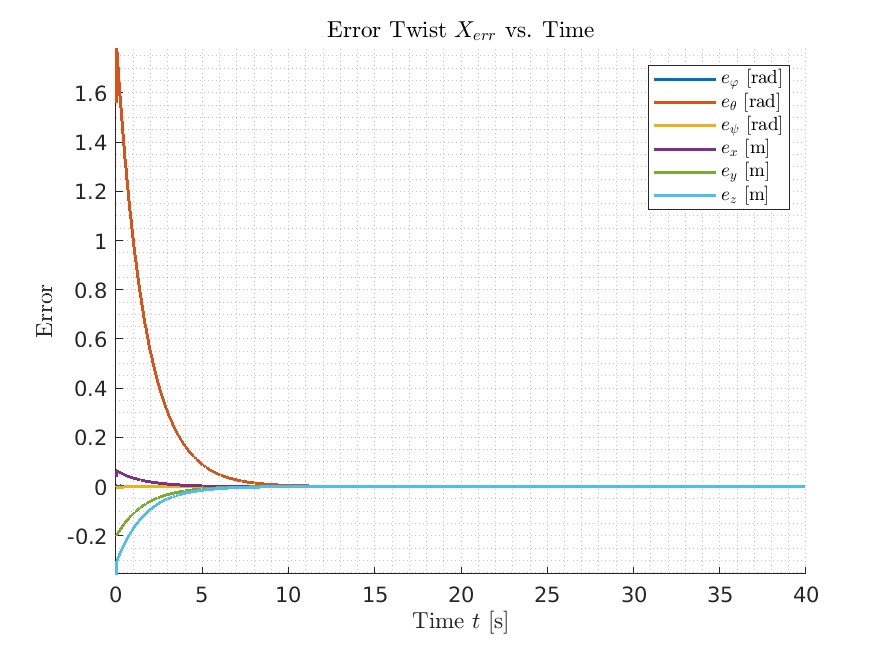
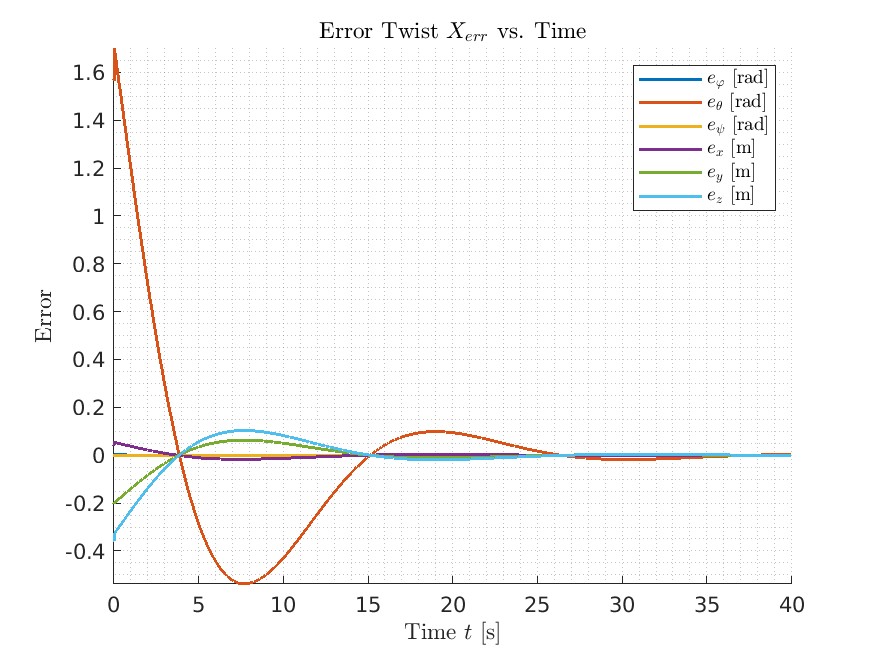
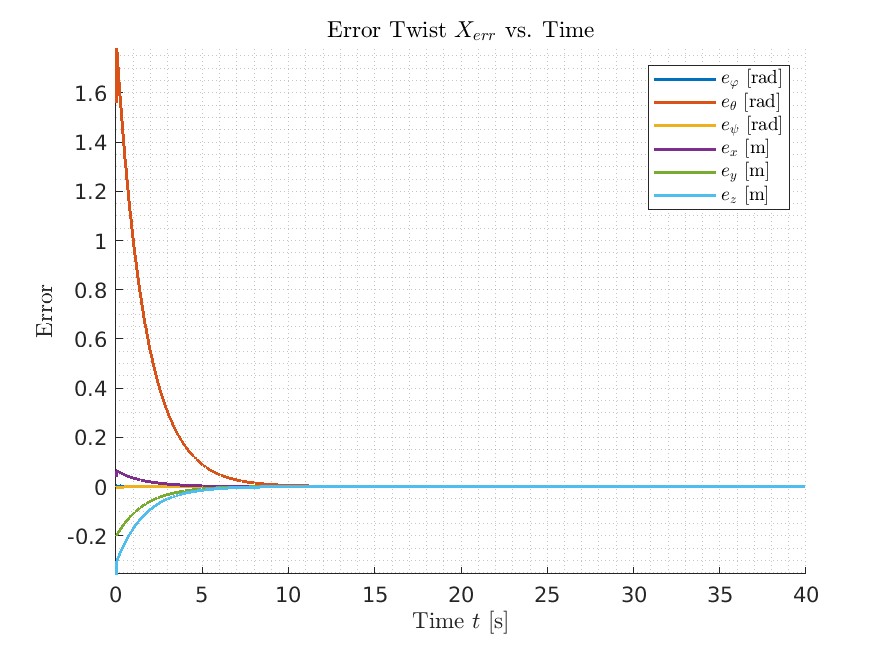
As shown in the error plot in the three senarios, on Best and New Task, after it converges, it stays on the planned path. And for the Overshot, it oscillates around the planned path and converges much slower than the other two scenarios.
Best
Overshoot
New Task
Challenges
- Finding Optimal
KpandKi: Discovering the ideal values forKiandKpposes a challenge in designing controllers that excel in various scenarios. Achieving optimal performance necessitates an iterative process for each parameter. Theoretical values alone often fall short of delivering the best results. To overcome this challenge, I invest a substantial amount of time in conducting extensive experiments. This approach allows me to identify and refine the most effective values for the controller, ensuring optimal performance across diverse situations.